Serial Port Tester
What is the Serial Port Test Utility?
It is a simple to use program for sending data over the comm port on a PC. It was written to make it easy to send simple commands in binary, as opposed to ASCII which most terminal programs require. This is useful when developing embedded applications:
- the developer is writing code for a new UART
- debugging a particular state of the communications protocol
- or reverse engineering an existing serial communications protocol in absence of the specification.
In addition a simple "Echo" test is provided which is useful for loading down
a serial port on a remote device to make sure that the rest of the system
remains responsive when operating at full baud. The program is written entirely
in Java and should run on most platforms (see install instructions below). Full
source is provided and can be used for any purpose. If you wish to modify the
GUI component you may want to consider using Borland JBuilder Professional or
Enterprise. JBuilder has a feature called "XYLayout" which makes
changing/building the GUI much simpler than with the GridBaglayout (how it is
distributed), first time Java developers may become frustrated using
GridBagLayout without JBuilder.
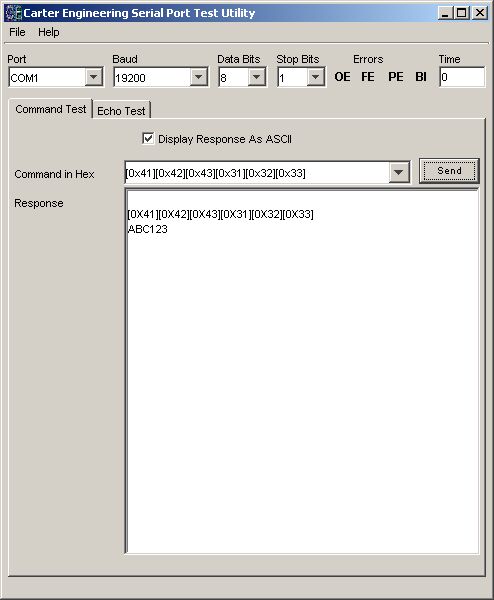 Shows the command test, with response
as binary and as ASCII. In this case the remote machine was programmed to echo
the command. Commands are saved in the drop down list for easy recall. Only
valid HEX values can be entered, formatting ([0x]) is automatic.
Shows the command test, with response
as binary and as ASCII. In this case the remote machine was programmed to echo
the command. Commands are saved in the drop down list for easy recall. Only
valid HEX values can be entered, formatting ([0x]) is automatic.
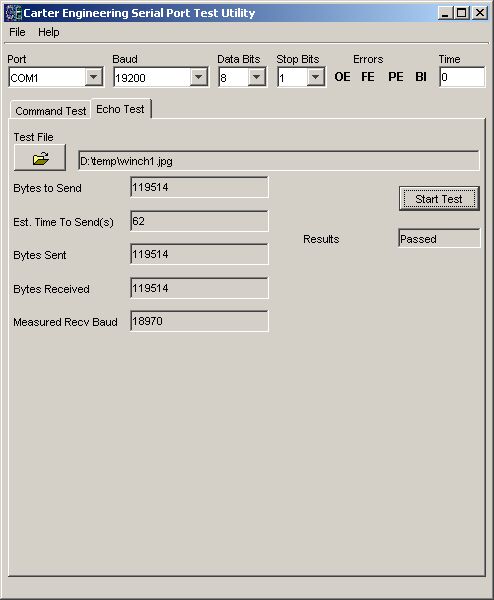 Any file can be used as input. After
the file has completed being sent the program waits for the receive thread to
end or for a time out period. After the receive thread completes the received
data is compared to the data sent, if it is the same the test passes, fails
otherwise.
Any file can be used as input. After
the file has completed being sent the program waits for the receive thread to
end or for a time out period. After the receive thread completes the received
data is compared to the data sent, if it is the same the test passes, fails
otherwise.
How to Install
Download and Unzip this file.
For Windows platforms do the following:
Determine where your Java Runtime Library (JRE) is installed (c:\Program Files\Java\j2re1.4.1_01, c:\Program Files\JavaSoft\JRE\1.3.1_02, etc ) and in
JRE\bin place the win32com.dll file
JRE\lib place the javax.comm.properties file
Place the SerialTesterW.exe file in any directory, double click to run. If you do not see any ports listed you have installed the win32com.dll or javax.comm.properties file incorrectly.
All other platforms:
See these links for installing the Comm API:
Java(TM) Communications API Solaris
Java Comm Serial API How-To for Linux Linux
JAVA Comm API for FreeBSD Free BSD
Java COMM API Support on the PocketPC PocketPC
Then use the serialtester.jar file contained in the zip file. I haven't tested any platform besides Windows.